
Melbet Partners Affiliate Account - Complete Guide
A guide to the Melbet Partners affiliate account. Dashboard, links and promo codes, reports and statistics, payment history, profile.
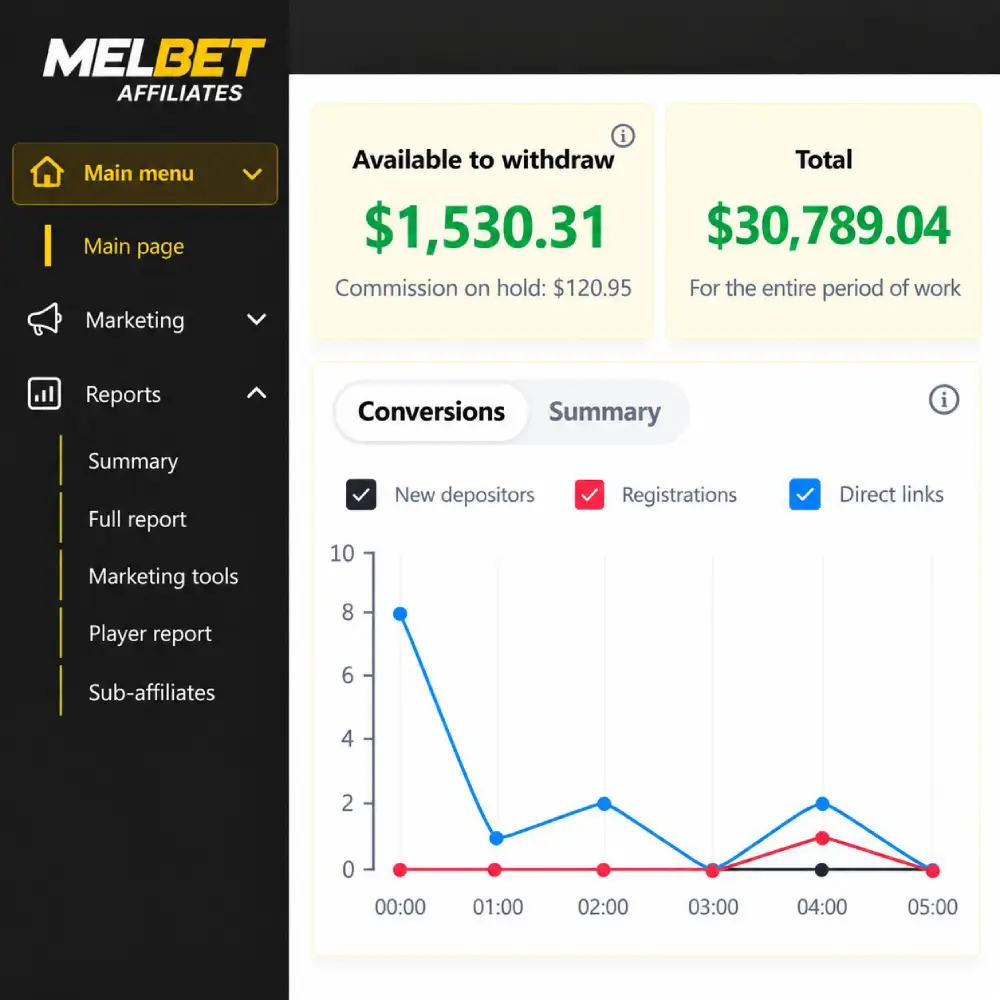
The Melbet Partners affiliate account is used to create links and promo codes, get promo materials, analyze statistics and track payouts. To work from a phone, there is the mobile app for partners for Android.
Dashboard
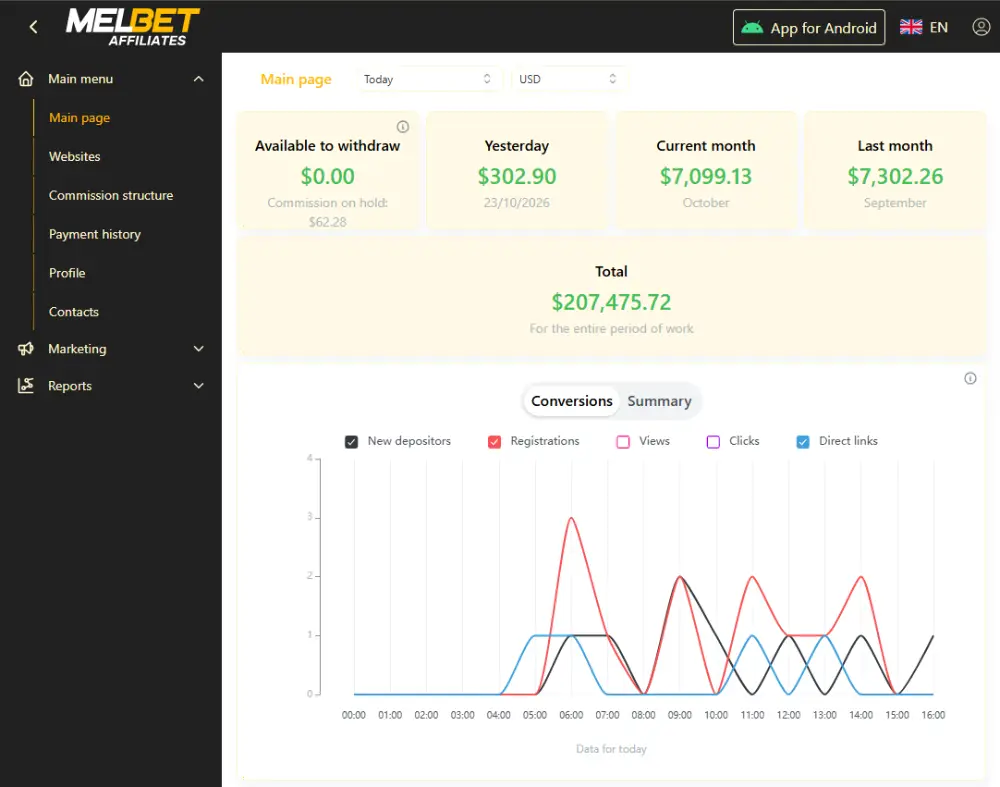
The dashboard shows a short summary of the partner’s work. Income blocks are displayed at the top of the page.
- Available to withdraw — the amount available for withdrawal.
- Yesterday — income for yesterday.
- Current month — income for the current month.
- Last month — income for the previous month.
- Total — income for the entire period of work.
If the Available to withdraw block shows 0, the accumulated commission is not enough for a payout. The minimum payout is $30. Commission that has not reached the minimum is carried over to the next period.
Other blocks on the dashboard.
- Conversion chart. New depositors, registrations, impressions, clicks and direct links for the selected period. A combined view is available.
- Top traffic origins. Countries with the highest income and number of players.
- Players. The number of new and active players.
- Top players. Players with the highest income or deposit amount.
- Get affiliate link and Get promo code. Quick creation of an affiliate link and a promo code.
- Stats summary. A table for the last 7 days. Impressions, clicks, direct links, registrations, new depositors, deposit amount.
Adding a website
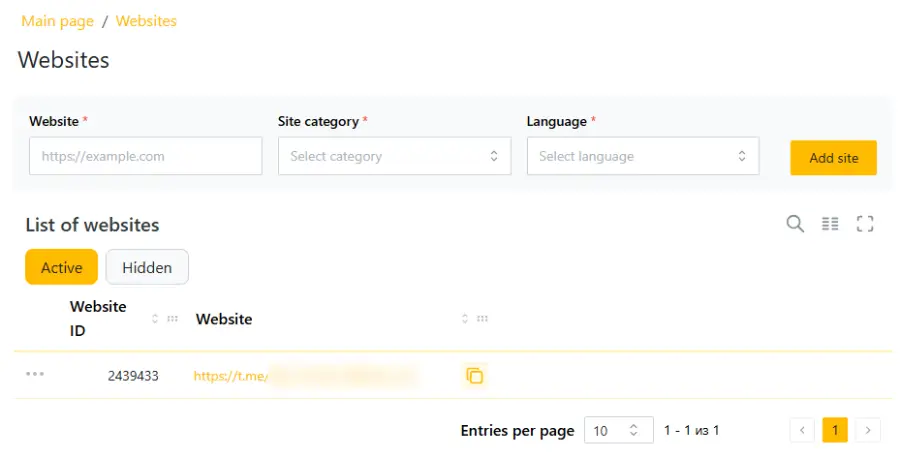
If you have several websites or social media groups, you can analyze statistics for each of them. After registration, add your additional sources. In the menu, select the Websites section.
In this section you add websites, channels and groups that have separate statistics. To add a source, enter the address, category and language, then click Add site. The source specified at registration is already in the list. Unused sources can be hidden, and they move to the Hidden tab.
Marketing
Affiliate links
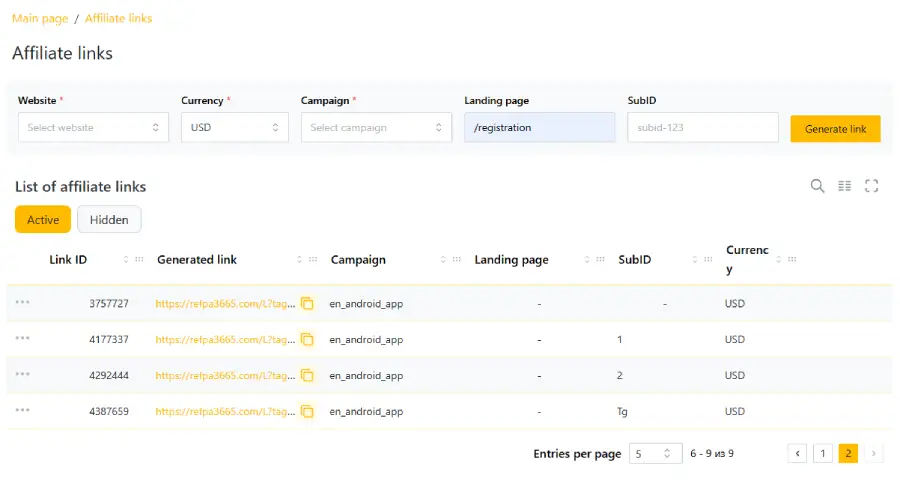
An affiliate link ties a player to a partner. A player who follows the link lands on the Melbet website or in the app and is recorded in the partner’s database. To create a link, open Marketing → Affiliate links, select the website, currency and campaign, and click Generate link. Additional fields.
- Landing page — the page the player lands on, for example registration, a match or bonuses.
- SubID — a tag for traffic analysis. Each source gets its own SubID, and the reports then show statistics for each tag.
Promo codes
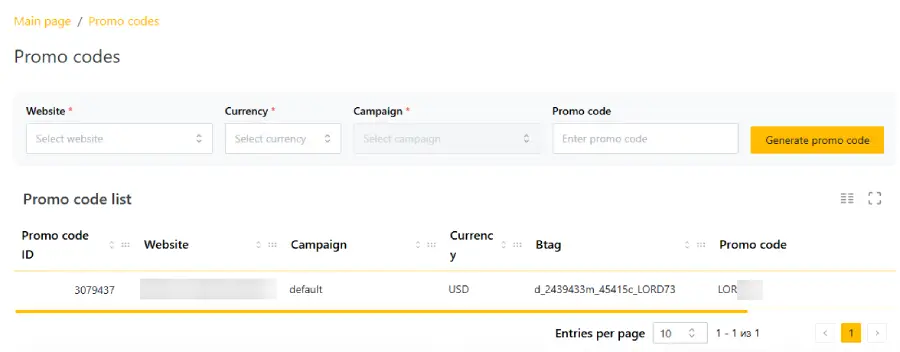
A promo code ties a player to a partner in the same way as a link, and also gives the player an increased bonus. To create one, open Marketing → Promo codes and click Generate promo code. A code in the format ml_799537 is created automatically. A custom promo code with the name you need is created by the manager on request.
Media
The Media section contains banners. Filters by size, language, format and currency are available for search. If the banner you need is not there, contact your manager or support and specify the size, theme and deadline.
Statistics and reports
Reports are in the Reports menu.
- Statistics are updated about every 30 minutes on average.
- Today’s data changes during the day and is not final.
- Final data is fixed overnight. Exact statistics are available starting from yesterday.
- The result of any report depends on the selected period. Check the period before analyzing.
Short summary
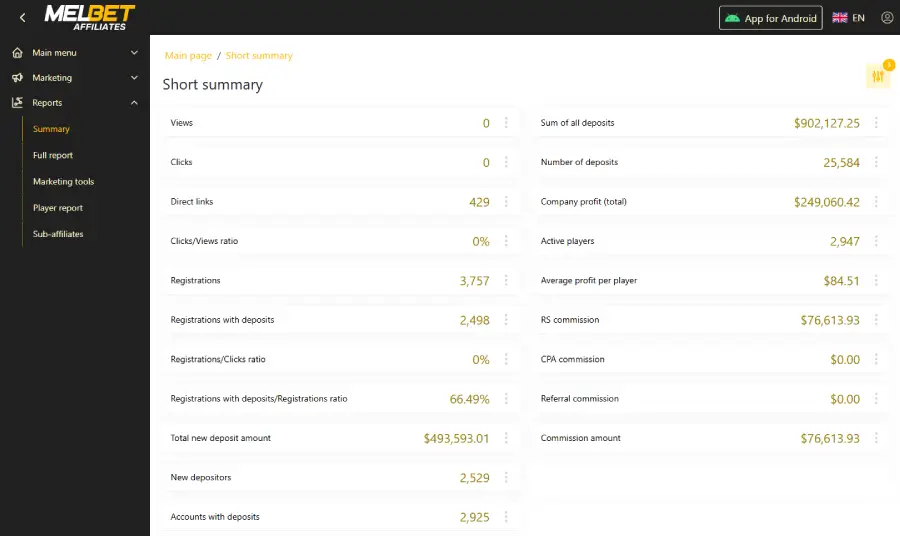
Used for a quick, general analysis for the selected period. Metrics. Impressions, clicks, registrations, registrations with deposits, new depositors, deposit amount, active players, average income per player. Commissions by model (RS, CPA, referral) and the total commission amount are shown in separate blocks.
Full report
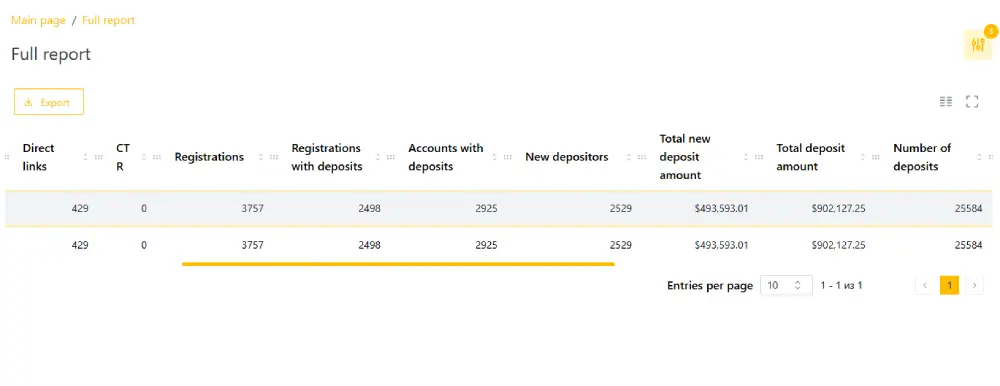
If a partner uses several websites or other sources and has added them in the Websites section, it is convenient to view statistics by source in the Full report. It gives detailed statistics broken down by website. Columns can be hidden, and the report is exported with the Export button.
Player report
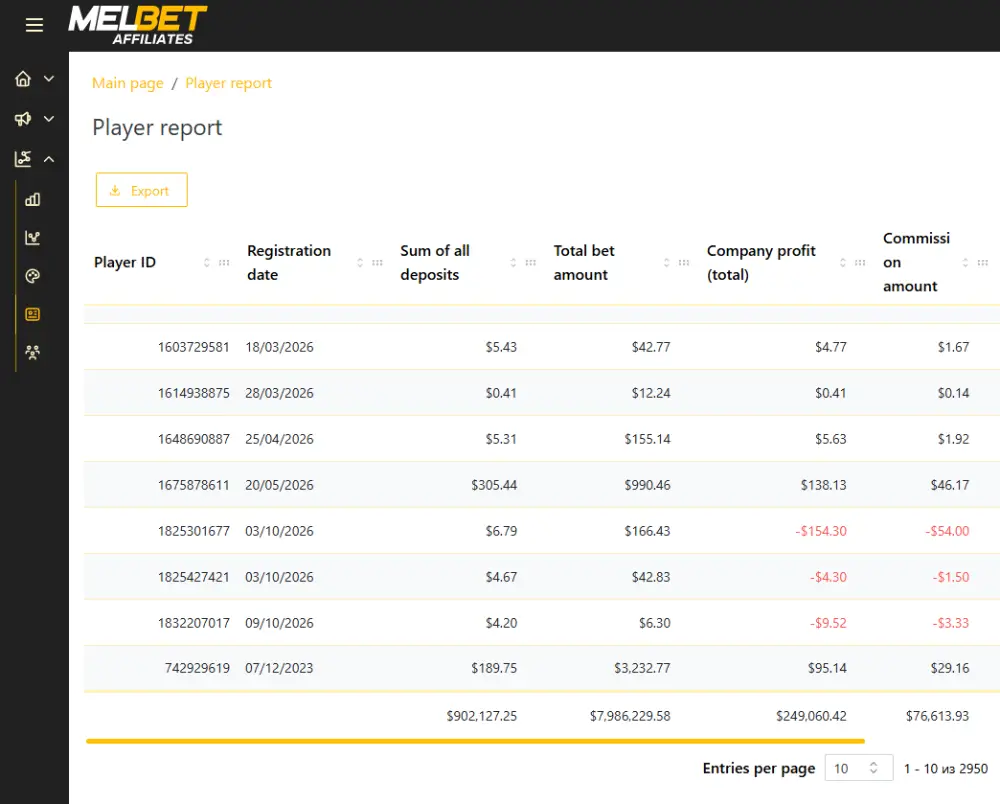
The Player report stands out for its detail, accuracy and data update speed. It is used to find players linked to the affiliate account by a link or promo code, and to track a player’s activity by period.
For each player, the report shows the country, registration date, deposit amount, bet amount, wagered bonuses, income and partner commission.
Filters let you search by player ID, SubID, website, campaign, promo tool and country.
Two parameters are off by default.
- New players only — new players only.
- Non-depositing players only — only players without deposits.
If a player is missing from the report, check two conditions.
- The player registered but did not make a deposit. In this case, turn on Non-depositing players only.
- The selected period does not contain the player’s activity. Players play on different days, so widen the period.
To view play by day, select individual dates.
Sub-affiliates report
A report on partners invited to the program and the commission from their activity. If there are no invited partners, the report is empty.
Commission structure
The Commission structure section shows the terms of cooperation. Model, scheme name, start date and a short description. To change the terms, contact your manager.
Payment history
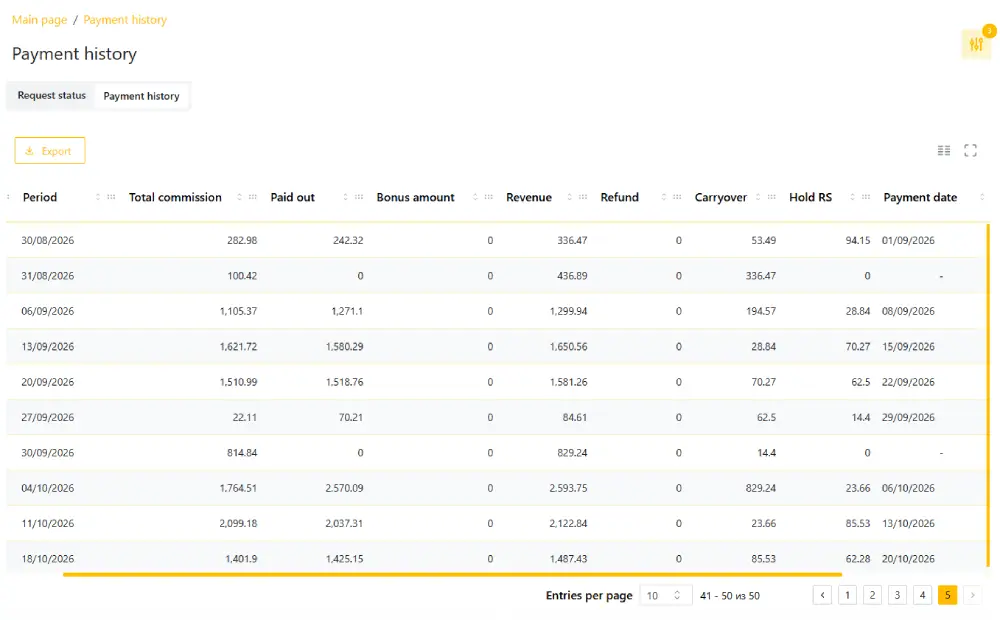
The section has two tabs. Request status shows the statuses of payout requests. Payment history shows the commission history by week.
The settlement week runs from Monday to Sunday. On Monday the commission for the week is fixed, and on Tuesday the payout arrives. If the commission is not enough, it is carried over to the next period.
Table columns.
- Total commission — commission accrued for the week.
- Paid out — the amount paid.
- Carryover — the amount carried over to the next period.
- Hold RS — the amount for unsettled bets. While the result of a bet is unknown, part of the commission is temporarily frozen. It is calculated later than the commission, after the bet is played.
- Payment date — the date of payout.
- Available to withdraw — the balance available for withdrawal.
The minimum payout is $30 per week. For the first payout you need to contact your manager, after that payouts are made automatically.
Profile
The Profile section shows account information.
- Account info. Aff ID, username, contact details. To change the details, contact your manager.
- Payment details. The payout method and the account number for payouts.
- Your manager’s contacts. Contacts of your personal manager. The block lets you verify the manager’s authenticity by comparing the email, messenger and username with the data shown in the block.
- Subscriptions. Subscriptions to campaign and program news, promotions and promo materials, training materials, and notifications about new domains.
The program team’s contacts are in the Contacts section.
FAQ
How do I restore access to the account?
Click Forgot password on the login page and enter the login or email linked to the account. A new password will be sent to your email. If you do not know your login, contact your manager.
A player is not shown in the report. What should I do?
Check the selected period and the New players only and Non-depositing players only filters. A player without a deposit is shown only when the second filter is on.
Why does the Available to withdraw block show 0?
The accumulated commission has not reached $30. It is carried over to the next period.
What is Hold RS?
Commission on bets whose result is not yet determined. The amount is temporarily frozen and is calculated after the bets are settled.
Today’s data differs from yesterday’s. Is this an error?
No. Today’s statistics are updated during the day. Final data is fixed overnight.
The banner I need is not in Media. What should I do?
Contact your manager or support and specify the size, theme and deadline.
Can I place an affiliate link on social media?
Yes, if it does not conflict with the rules of the specific social network.
I found an error in the statistics. What should I do?
Send an email to support with a detailed description and screenshots. A reply comes within a few days.